

Gateway Integration Guide
Schneider Com'X 210 / 510
Link your Schneider Com'X gateway to ecolyptus via HTTP to identify, track, and confirm energy savings across your facilities, without changing any existing meter infrastructure.
Book a Demo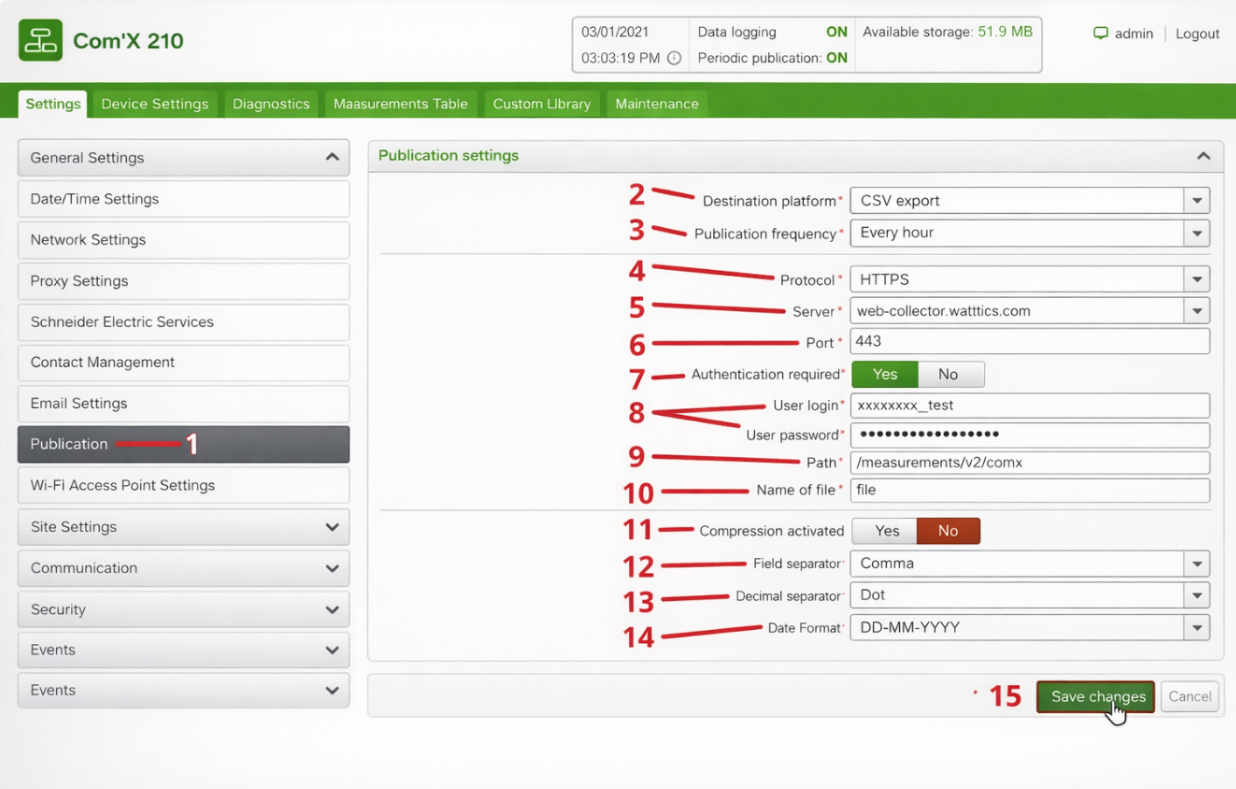
🔗
Integration Capabilities
The Schneider Com'X series serves as a powerful bridge between onsite hardware and ecolyptus intelligence.
- REST API Bridge: Push data from Com'X directly to our endpoints via JSON.
- File Ingestion: Automated HTTPS collection of historical log files.
- Full Estate Visibility: Consolidate data from multiple gateways into one dashboard.
- Edge Validation: Data is cleaned and validated at the gateway level before transmission.
- Legacy Support: Works with both Com'X 210 and Com'X 510 models.
- Real Time Alerts: Trigger ecolyptus notifications based on gateway status.
Prerequisites: This guide assumes your Com'X 210/510 Gateway is already gathering data from connected meters. If not, consult Schneider's official documentation first. All installation and configuration must be completed by trained professionals.
Setup Guide
Connect your Com'X in minutes
The Com'X gateway supports HTTP data log publication. Follow these steps to route your device data directly into ecolyptus.
(Refer to the numbered items in the screenshot for visual guidance)
1
Access the Com'X web interface
Type the device's IP address into your browser to open the Com'X web interface. Sign in with the default credentials below, or your custom credentials if you've already changed them.
Usernameadmin
Passwordadmin
2
Open the Publication settings
Navigate to Settings → General Settings → Publication. From the Destination Platform dropdown, choose CSV export.
3
Choose your logging frequency
Select how often the Com'X should push data logs to ecolyptus. The platform accepts any interval, choose what suits your monitoring needs.
Each logging intervalHourlyDailyWeeklyMonthly
4
Configure the HTTP connection parameters
Enter the following values in the Publication settings form. These route data securely to the ecolyptus collection endpoint.
| Field | Value |
|---|---|
| Protocol | HTTPS |
| Server | web-collector.wattics.com |
| Port | 443 |
| Authentication Required | Yes |
| Username | your ecolyptus username |
| Password | your ecolyptus password |
| Path | /measurements/v2/comx |
| Field Name | file |
| Compression | No |
| Field Separator | Comma |
| Decimal Separator | Dot |
| Date Format | DD-MM-YYYY |
📧 Your ecolyptus username and password are provided by the support team. Contact
support@ecolyptus.com if you haven't received them.5
Save your settings
Click Save Changes in the Com'X interface. Your device will begin publishing CSV data logs to ecolyptus at your chosen interval. Data will now flow automatically.
6
Create Datapoints in your ecolyptus dashboard
Sign in to ecolyptus and navigate to System Settings → Organisations. Add an Endpoint for your site, then add meters and datapoints corresponding to the channels your Com'X is collecting from.
7
Verify data is streaming correctly
In ecolyptus, open your dashboard and check the Data Monitor to confirm readings are arriving from your Com'X gateway.
- → Ensure the Com'X device has a valid internet connection.
- → Double check that your network allows outbound traffic on port 443.
Ready to reduce energy costs?
Our team will help you configure your Com'X integration and create your first datapoints.
Book a Demo