

Hardware Integration Guide
Accuenergy AcuREV 2100
Connect your Accuenergy AcuREV2100 to the ecolyptus platform via HTTP post. Capture granular multi-channel power data in real time, no rip and replace required.
Book a Demo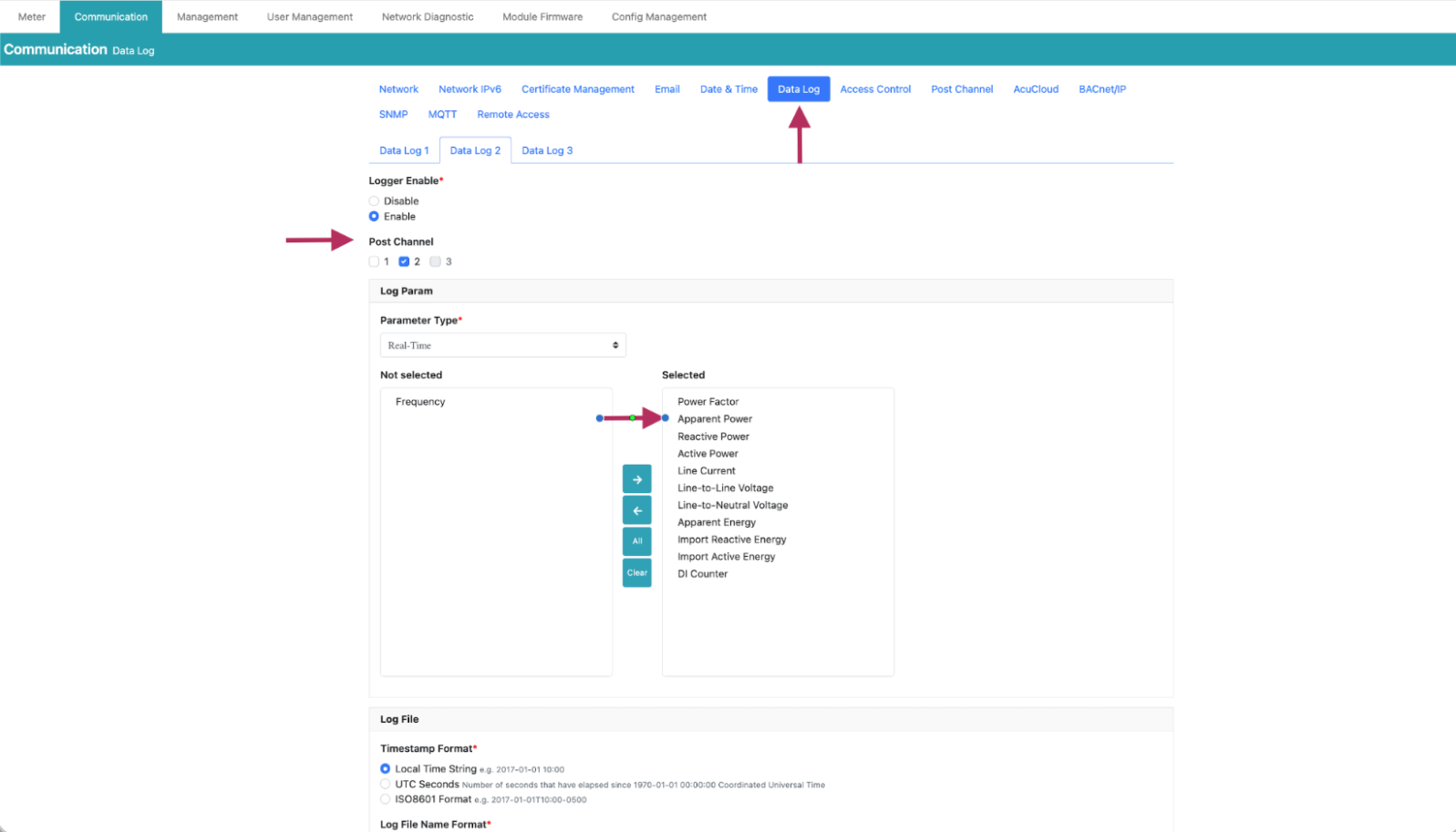
⚡
Multi-Circuit Monitoring
The AcuREV 2100 is ideal for high-density applications where space and cost-per-point are critical.
- Up to 18 Circuits: Monitor multiple single-phase or three-phase loads with a single device.
- Native Protocols: Integrated support for Modbus RTU/TCP and BACnet/IP.
- 1-Minute Data: Stream high-resolution energy data for granular load profiling.
- Billing Grade: High accuracy measurement (Class 0.5s) for cost allocation.
- HTTP Post: Secure data transmission directly to our cloud analytics.
- Compact Design: DIN-rail mountable for easy installation in existing panels.
Prerequisites: Your AcuREV2100 must be physically installed and accessible via its cloud portal before following this guide. Ensure you have admin credentials for the device.
Setup Guide
Seven steps to live data
Follow these steps in order to connect your AcuREV2100 and start streaming consumption data into your ecolyptus dashboard.
1
Activate your ecolyptus platform
Log in to your ecolyptus account and confirm your organisation workspace is active. If you don't yet have an account, request a demo to get started.
2
Request your connection credentials
Contact the ecolyptus support team to obtain your unique HTTP Post URL, password, and port number. These credentials are specific to your account and are required to authenticate the meter's data stream.
📧 Reach out via the in-app support chat or email
support@ecolyptus.com with your organisation name to receive your credentials promptly.3
Log in to the AcuREV2100 cloud portal
Open a browser and navigate to the AcuREV2100's cloud portal using the device's IP address or the Accuenergy hosted portal URL. Sign in with your device admin credentials.
4
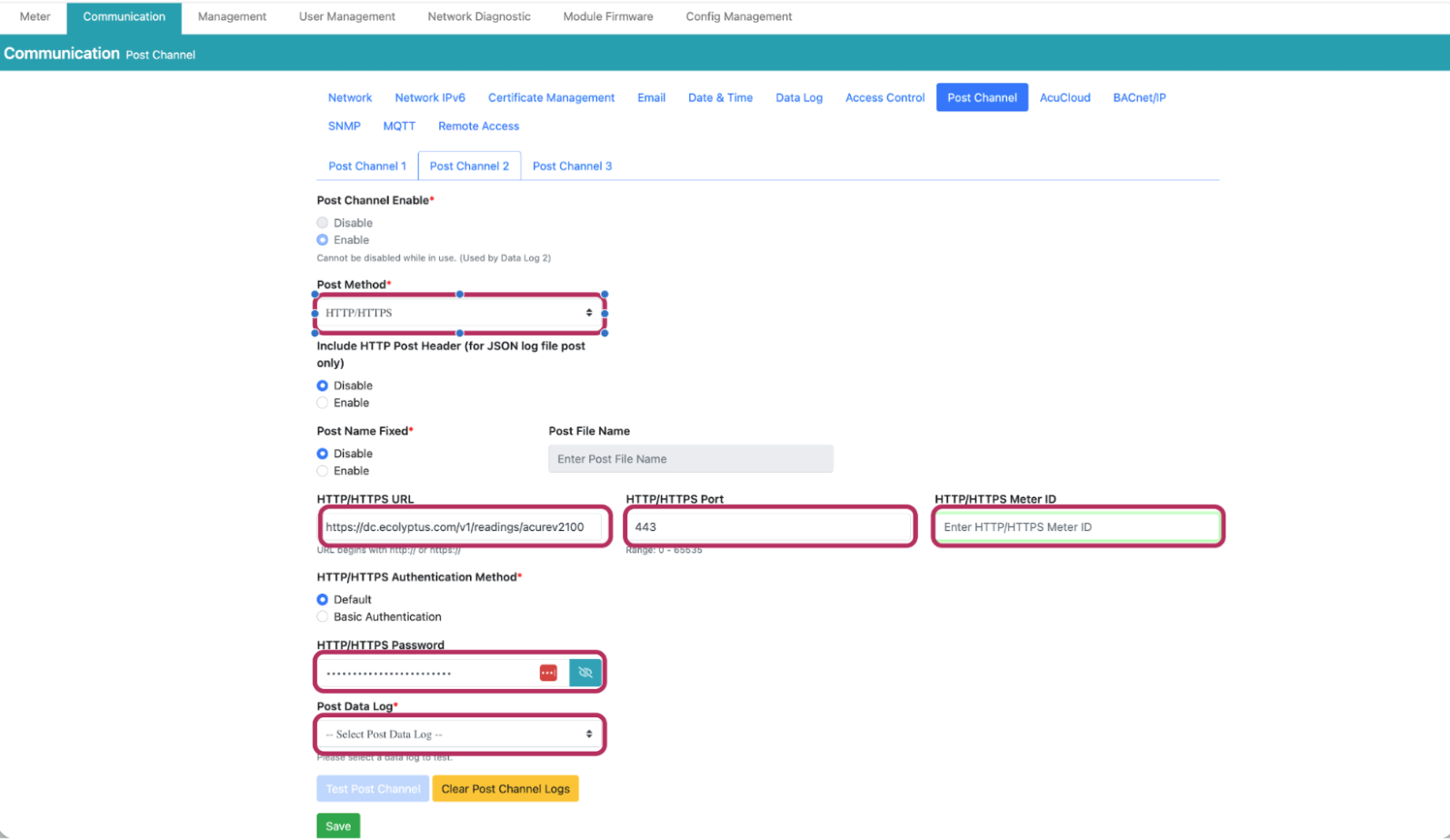
Configure the HTTP Post channel
In the AcuREV2100 portal, go to Communication → Post Channel. Enable the Post Channel and fill in the following fields with the credentials from Step 2:
| Field | Value |
|---|---|
| Post Method | HTTPS |
| HTTP/HTTPS URL | your ecolyptus post URL |
| HTTP/HTTPS Port | 443 (or as provided) |
| HTTP/HTTPS Meter ID | your MeterID |
| HTTP/HTTPS Password | your password |
| Post Data Log | Select appropriate data log |
💡 Ensure Post Channel Enabled is set to Enable before saving. The HTTP/HTTPS Meter ID must match exactly what you'll enter in ecolyptus in Step 6.
5
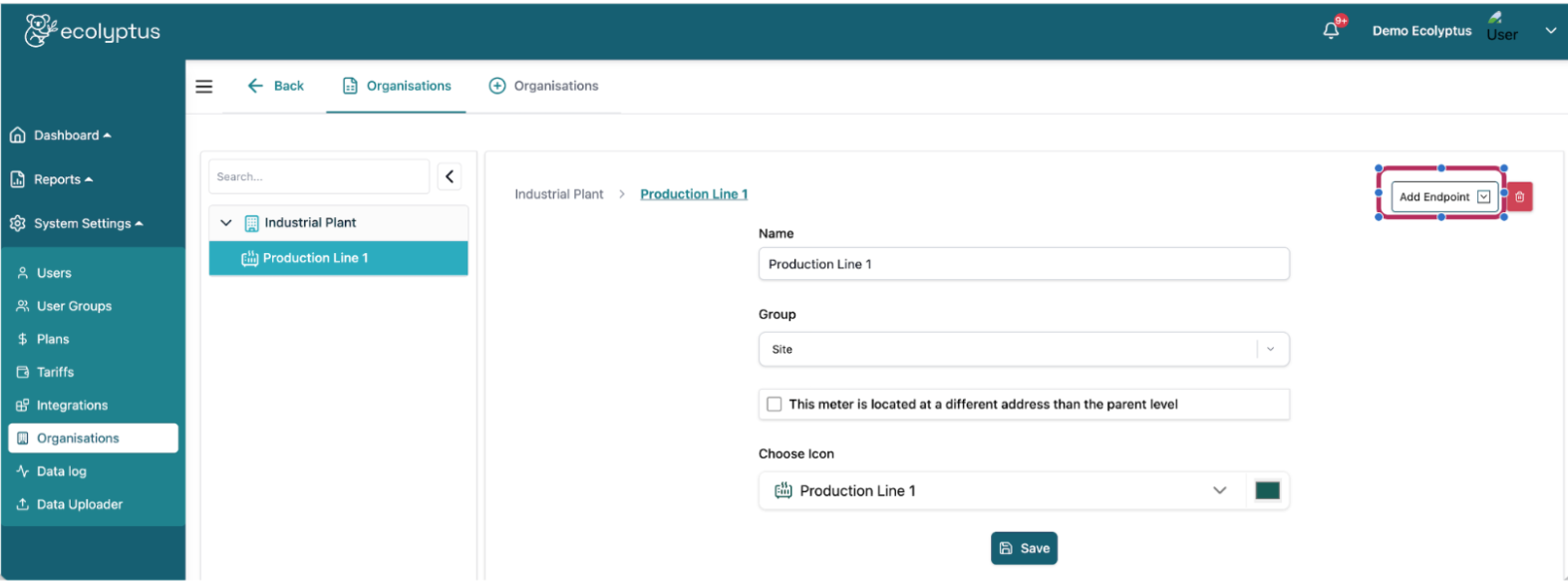
Create an Endpoint in ecolyptus
In your ecolyptus platform, navigate to System Settings → Organisations. Locate or create your site, then click Add Endpoint → Add Meter to register the AcuREV2100 as a data source.
6
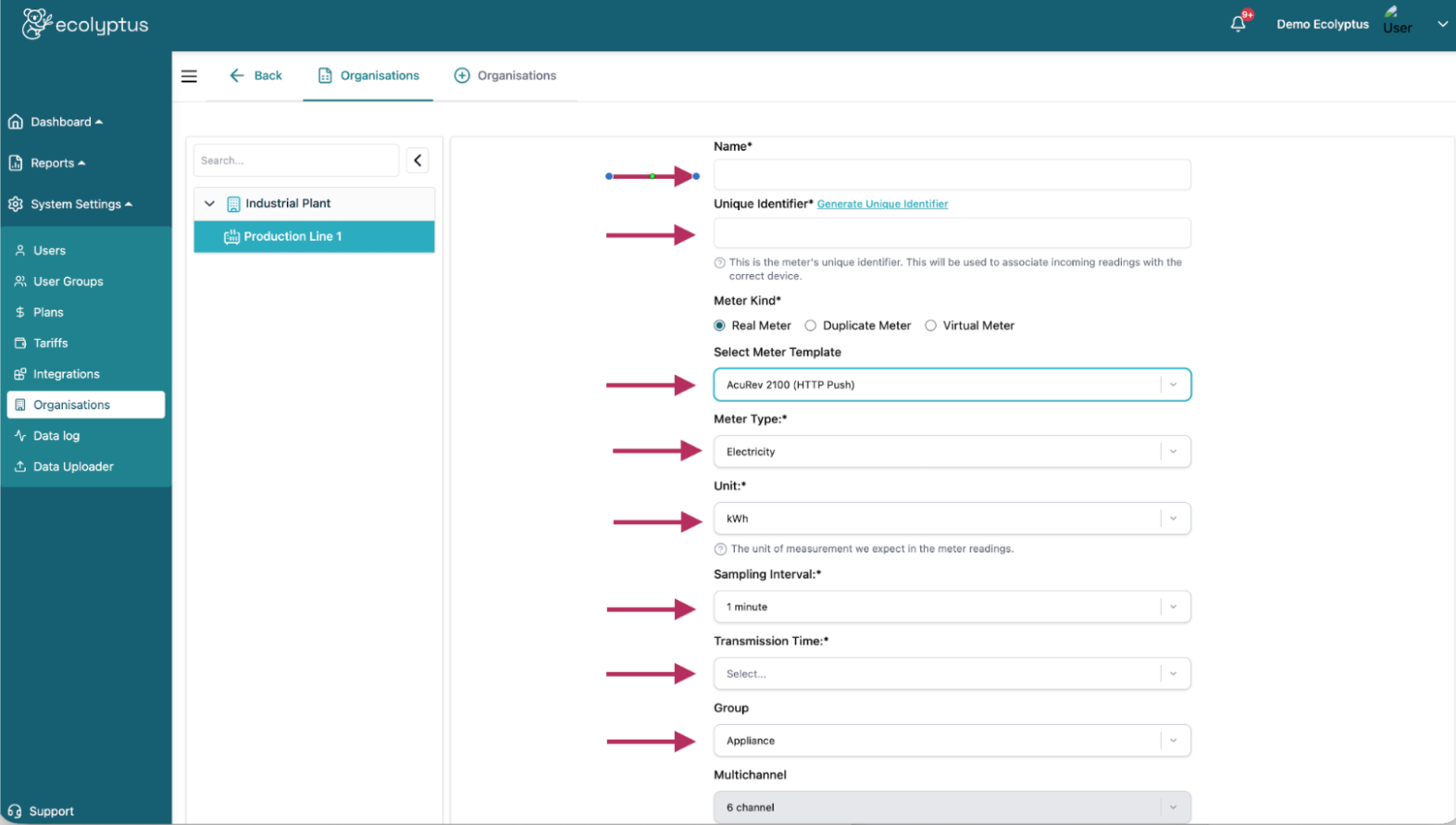
Enter Datapoint information for each channel
For each circuit channel, fill in the datapoint fields below. Repeat this process for every channel the AcuREV2100 is monitoring.
| Field | Value |
|---|---|
| Name | Friendly name for this channel (e.g. Production Line 1, Main Feed) |
| Unique Identifier | MeterID + channel suffix e.g. Accu1234567CH1ABC |
| Meter Type | Electricity |
| Unit | kWh |
| Sampling Interval | 5 min |
| Transmission Time | 5 min |
| Tariff | Select your energy tariff to enable cost conversion |
| CO₂ Factor | Your CO₂ factor (optional) |
Channel Unique Identifier mapping: Append the channel suffix to your MeterID for each new datapoint created:
CH1Accu1234567CH1ABC
CH2Accu1234567CH2ABC
CH3Accu1234567CH3ABC
7
Verify data is arriving
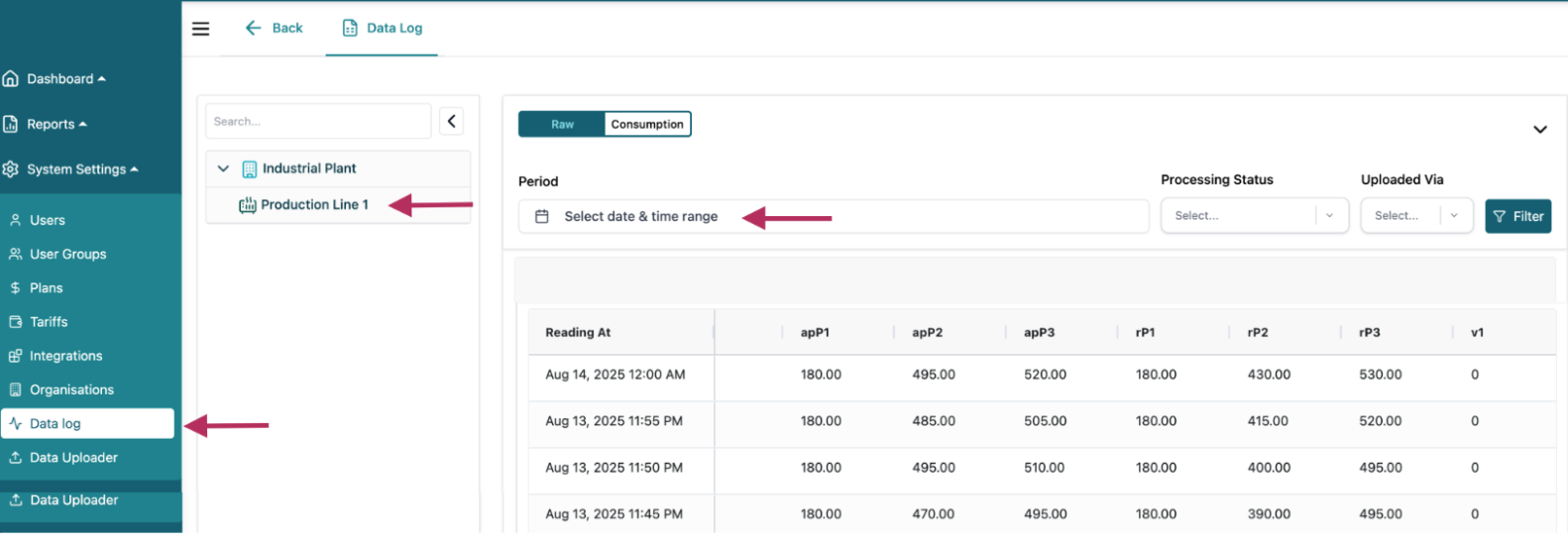
Navigate to System Settings → Data Log in ecolyptus. Select your organisation and the production line endpoint. Readings should appear within one transmission interval (5 minutes). Confirm values across multiple channels.
8
Configuration Complete
Your Accuenergy AcuREV 2100 is now successfully connected and streaming data to ecolyptus.
Need help with your setup?
Our support team can provide your credentials and walk through the configuration with you.
Book a Demo